
The compliance planet allows you to schedule your ADRAPS PEP report ahead of time. You can manually schedule and download ADRAPS PEP reports. Here is how to do this.
NOTE; Only person(s) assigned right to ‘Process PEP Report’ can carry out these operations
STEP 1: From the left hand side menu, click on ‘CBN ADRAPS PEP REPORT’ Check out fig. 4.6a below
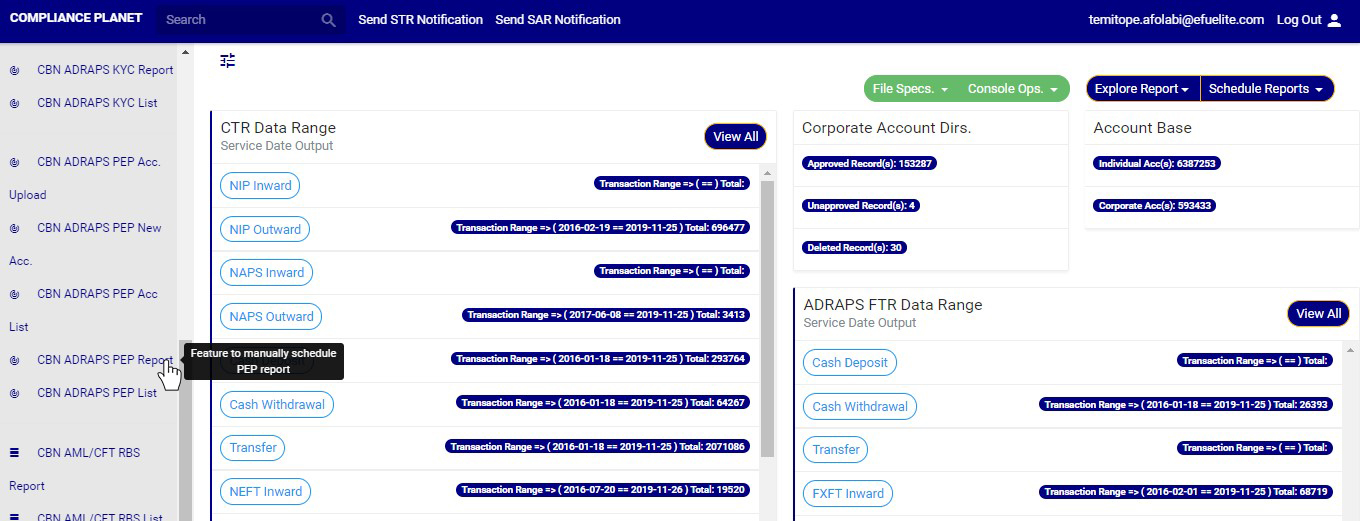
(fig. 4.6a)
➔ By clicking on ‘CBN ADRAPS PEP REPORT’, an ADRAPS PEP Scheduler as in fig. 4.6b below will be displayed.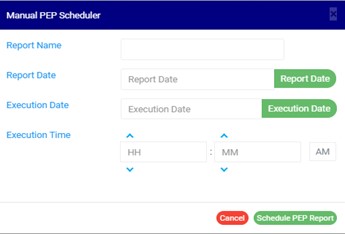
(fig. 4.6b)
STEP 2: Fill in the name of your report in the REPORT NAME box. The report name should be any title of your choice for easy identification. (See fig. 4.6c for an example.)
STEP 3: Click on the REPORT DATE button to select the date for which you want to generate an ADRAPS PEP report from a calendar as shown in fig. 4.6c below.
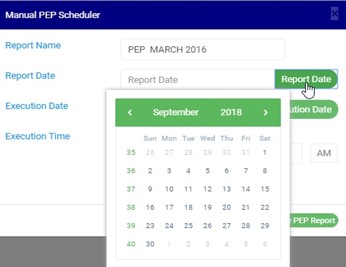
(fig. 4.6c)
➔ Take a look at the arrows labelled a to d in fig.4.6d to study the calendar.
a. Click on the given year to change it to your year of choice.
b. Click on the given month to change it to your month of choice.
c. Then, click on the date of the month.
d. You can also click on the angle brackets on the calendar [ ‘’ ] to go backward or forward.
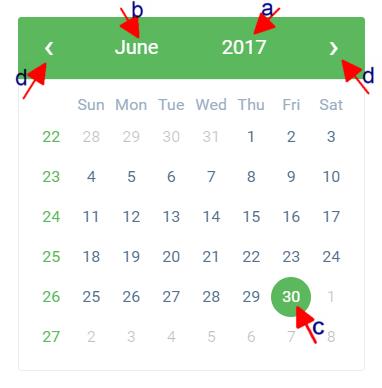
(fig. 4.6d)
STEP 4: Click on the EXECUTION DATE button to select the date you want your ADRAPS PEP report to be processed from as shown in fig. 4.6e below. The calendar works like the one in fig. 4.6d above.
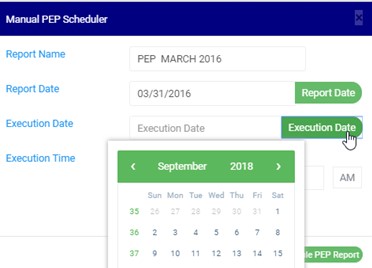
(fig. 4.6e)
STEP 5: Set your report’s EXECUTION TIME by filling in the ‘hour’ and the ‘minute’ you want the report to be processed. There’s a button next to the hour and minute boxes used for switching between AM and PM. See an example in fig. 4.6f below.
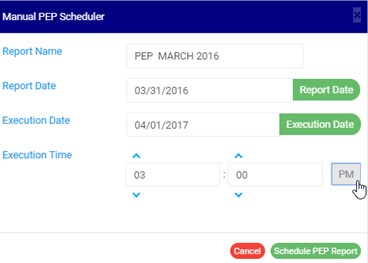
(fig. 4.6f)
STEP 6: Click on ‘SCHEDULE PEP REPORT’ to create your report or CANCEL to close the console. These buttons are at the bottom-right corner of the console. See them in fig. 4.6f above.
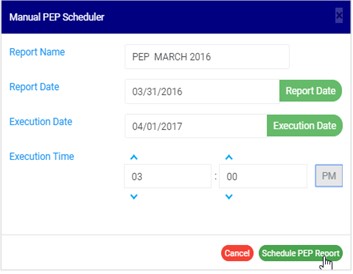
(fig. 4.6g)
➔ This displays a confirmation console.
Click CONFIRM to confirm your request to schedule the report or CANCEL to go back to the scheduler. See fig. 4.6h below for an example of the confirmation console
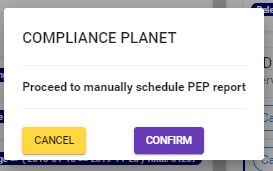
(fig. 4.6h)

One thought on “How to generate PEP Report In Compliance Planet Anti Money Laundering/Core Banking Finance Software”