
This feature is used for creation of single PEP account. Here are the steps to creating a new PEP account.
NOTE: Only person(s) assigned right to ‘process PEP Report’ can carry out these operation(s)
STEP 1: From the left hand side menu, click on CBN ADRAPS PEP New Acc. as in fig. 4.4a .

(fig. 4.4a)
- This displays a ‘CREATE NEW PEP ACCOUNT’ console as in fig 4.4b below.
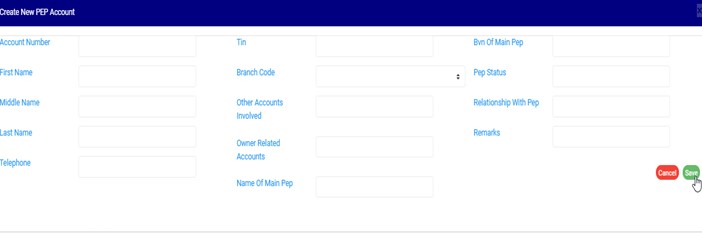
(fig. 4.4b)
STEP 2: Enter details of the new PEP account you want to create. Some fields are mandatory to successfully create a PEP account. They are;
● Account Number – ensure the account number exists on the Compliance planet’s account base.
● First Name
● Middle Name
● Last Name
● Telephone
● Branch Code
See fig 4.4c below for an example.
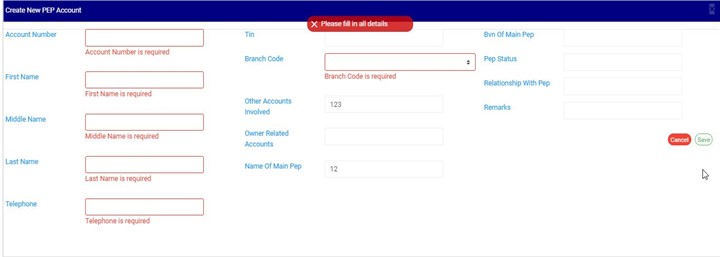
(fig. 4.4c)
STEP 3: Fill in the required details and Click on SAVE to create the PEP account
➔ Clicking on SAVE, displays a confirmation console as in fig. 4.4d below
➔ During the upload and single entry of PEP accounts, the software automatically scans other accounts related to the record entered using the CUST ID as identifier and also auto migrate these records into software.
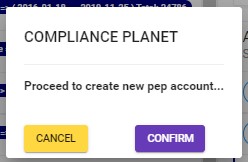
(fig. 4.4d)
➔ Click on cancel to go back to the console.
➔ Click on proceed to confirm your request to create new PEP account. A notification will be displayed as in fig. 4.4e below.

(fig. 4.4d)
For further enquiries :
Tel +234(0) 816 555 9818
Email solutions@efuelite.com
Web http://solutions.efuelite.com

One thought on “How to profile PEP Account In Compliance Planet Anti Money Laundering/Core Banking Finance Software”