
This section provides a guide on how to perform operations pertaining to Branch codes on the Compliance Planet, with step-by-step instructions and pictures.
A branch refers to a retail location where a financial institution offers a wide array of face-to-face and automated services to its customers. It is also referred to as ‘KIOSK’ on the compliance planet. Every branch of a bank has a unique code referred to as ‘Branch code’. This code distinguishes a branch from another. Every branch code has a description (Branch Description) which basically tells the area where that branch is located. A branch code is also referred to as ‘Sort Code’.
BRANCH CODE OPERATIONS
Under this feature, the compliance planet provides a list of the branch codes of the financial institution and their descriptions. The operations pertaining to branch codes on the planet include creating a new branch, activating or deactivating a branch and deleting a branch, with options to carry out bulk operations also.
NOTE: Only person(s) profiled as deputy supreme admin can carry out these operations
To perform any of the operations on branch codes;
STEP 1: From the main dashboard, click ‘CONTROL PANEL’ as in fig 19.2a below.
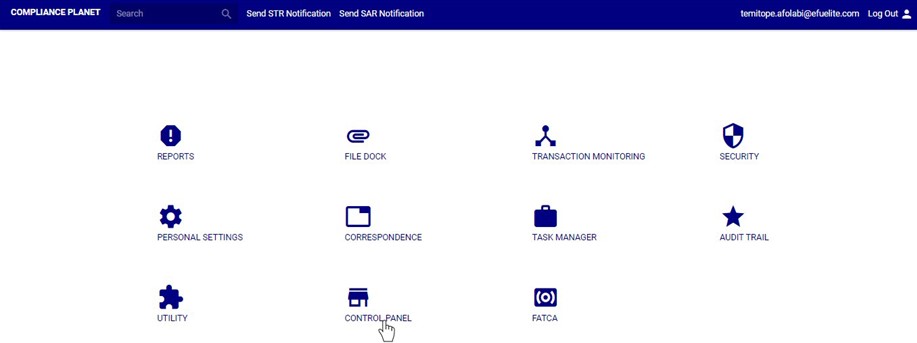
(fig. 19.2a)
➔ STEP 2: Click on ‘BRANCH CODE(S)’ from the left hand side menu as in fig. 19.2b below.

(fig. 19.2b)
➔ This displays a page showing a list of all the financial institution’s branch codes and their descriptions as in fig. 19.2c.
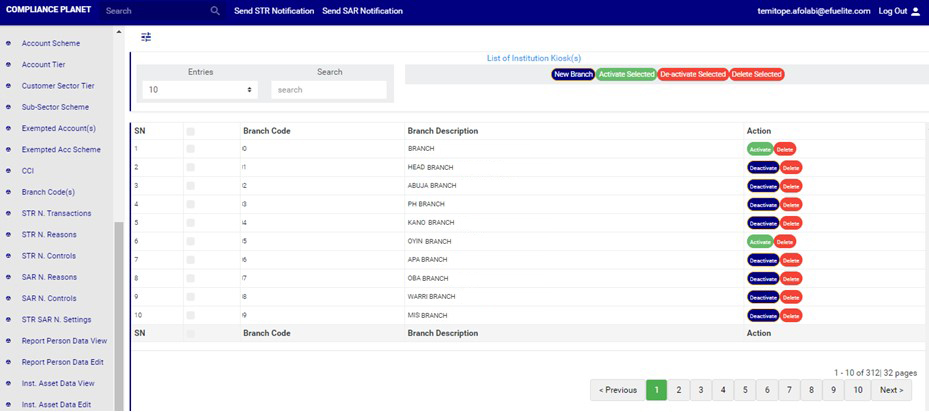
(fig. 19.2c)
