
NOTE: This action can only be done by person(s) profiled as either Team Lead 1 or Team Lead 2
STEP 1: Click on the checkbox beside the report type to select the Notifications you want to delete on the ‘Revision Officer pending Notification’ page. See an example in Fig 6.3an below

(fig. 6.3an)
- You can also select all Notifications on the page by clicking on the checkbox at the top. See an example in fig 6.3ao below
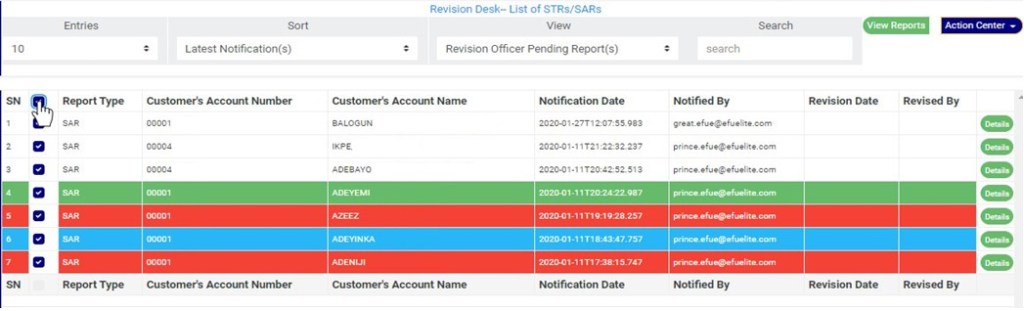
(fig. 6.3ao)
STEP 2: Click on the “Delete Notification(s)” button on the action center dropdown as shown in Fig 6.3ap below
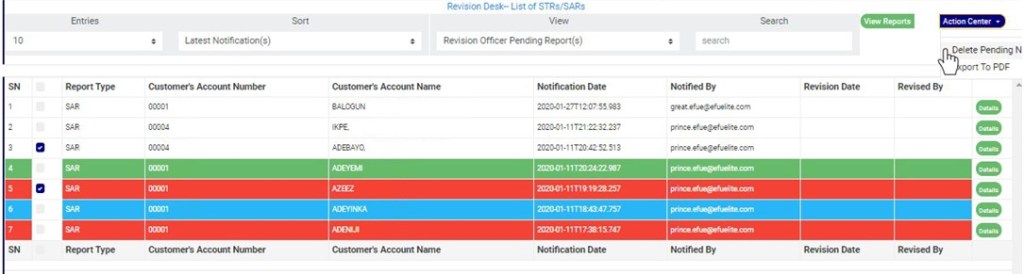
(fig. 6.3ap)
STEP 3: Clicking on “Delete Notification(s)” will display a console to confirm your selected action. See an example in Fig 6.3aq below. To proceed, click on CONFIRM and to dismiss the operation, click on CANCEL.
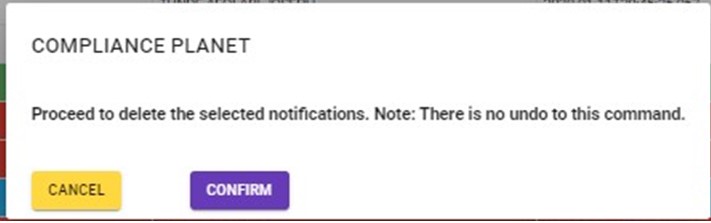
(fig. 6.3aq)
- Click on ‘CONFIRM’ as in fig. 6.3aq above to delete the Notifications or cancel to discontinue action.
For further enquiries :
Tel +234(0) 816 555 9818
Email solutions@efuelite.com
Web http://solutions.efuelite.com
