
When an STR/SAR notification is rejected by the supervising officer, the notification can be revisited for re-processing by the revision officer.Below are steps on how to revise notifications that have been rejected by the supervising officer.
NOTE: You have to be profiled as a revision officer with rights to EDIT to be able to carry out this operation.
STEP 1: Click the VIEW box on the revision desk page; select ‘supervising officer rejected Notification(s)’.
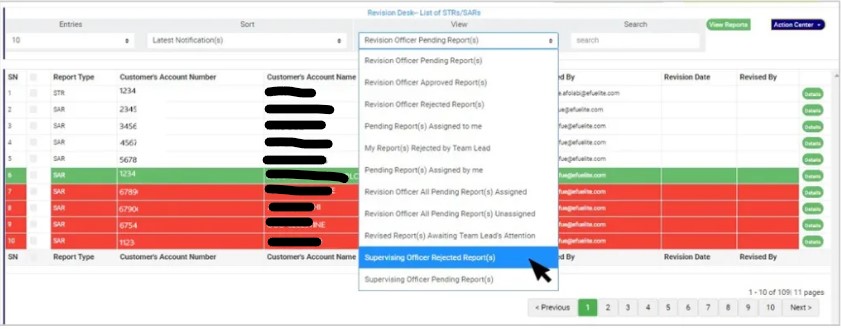
(fig. 6.3r)
STEP 2: Click on ‘VIEW REPORTS’ to see the Notifications as in fig. 6.3t below. On this page, the revision officer will be able to re-process Notification for approval again.
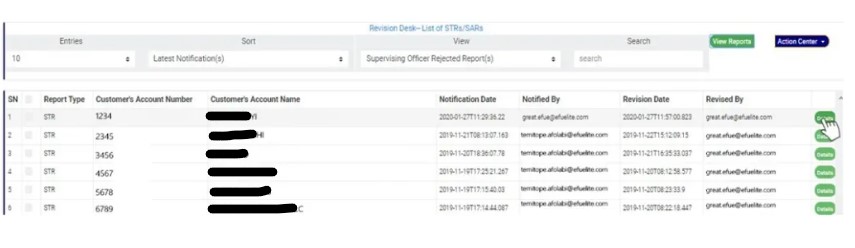
(fig. 6.3t)
- To see details of the Notification, click on ‘DETAILS’. Every notification still undergoing processing has this button at the end of its row.
STEP 3: Clicking on the DETAILS button (as shown in fig 6.3t above) will display a console which allows you to revisit the Notification. See fig. 6.3u below for an example.

(fig. 6.3u)
STEP 4: Edit the details you want to change. You can edit all information except the notification itself. This means you can change the Reason for filing report, General information about transaction activity, Extra details, Action taken and reason to decline.
STEP 5: Click on REJECT or ACCEPT. This displays a confirmation console to confirm your selected action. Check that you are sure of your options before rejecting or accepting the notification as this step cannot be reversed once confirmed. See fig. 6.3v and 6.3w to see a planet inquiry when you decide to ‘reject’ and when you choose to ‘accept’ respectively. To proceed, click on CONFIRM and to cancel the review, click on CANCEL.

(fig. 6.3v) (fig. 6.3w)
For further enquiries :
Tel +234(0) 816 555 9818
Email solutions@efuelite.com
Web http://solutions.efuelite.com
