
This section provides a brief visualization summary of all product tiers present in the institution, whether classified or not, in the Compliance Planet Anti-Money Laundering/Core Banking Finance Software, along with step-by-step instructions and pictures.
From the app dashboard, click “REGULATORY REPORTS,” as shown in the Figure below.
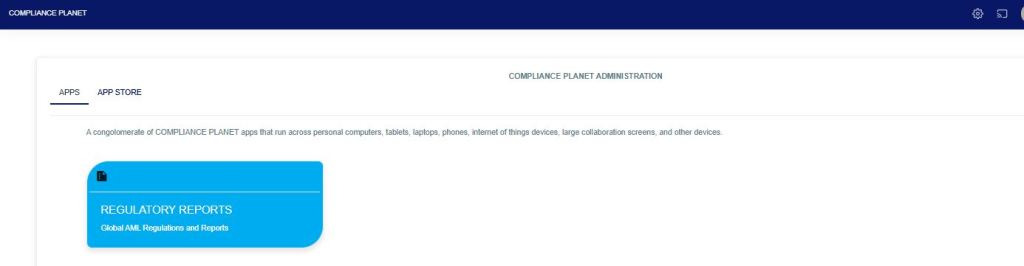
Fig
Click on “CBN ADRAPS KYC” on the drop-down list, and this displays the ADRAPS KYC page as shown in the Fig. below.
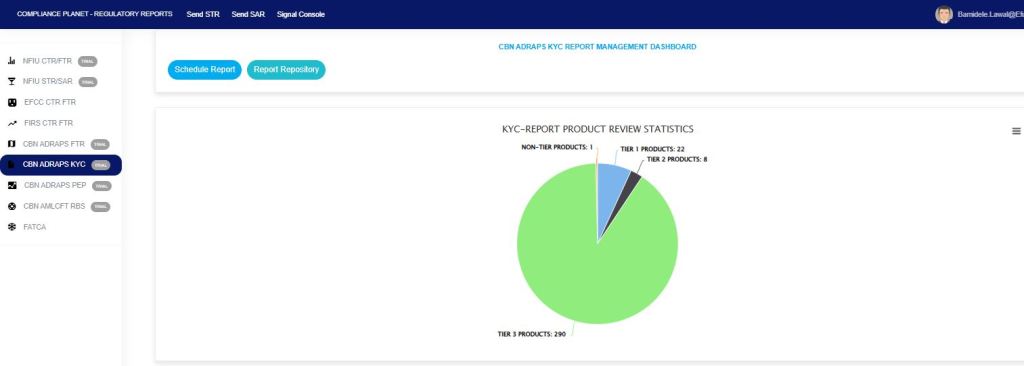
Fig
This displays all account product(s) classified as Tier 1, Tier 2, Tier 3, or Non-Tier. This Non-Tier product will not be captured for CBN ADRAPS KYC reporting, nor for CTR/FTR and STR reporting purposes.
For further enquiries:
Tel: +234(0) 816 555 9818
Email: solutions@efuelite.com
Web: http://solutions.efuelite.com

Great post! Your detailed insights on CBN ADRAPS KYC review and compliance are truly valuable for professionals in banking and finance. Very informative and well explained!
LikeLike