
This section provides a guide on how to use the Transaction Monitoring Case Explorer feature in the Compliance Planet Anti-Money Laundering/Core Banking Finance Software, complete with step-by-step instructions and illustrations.
STEP 1: From the app dashboard, click “DIGITAL FINANCIAL CRIMES SURVEILLANCE” as in Fig. a below.
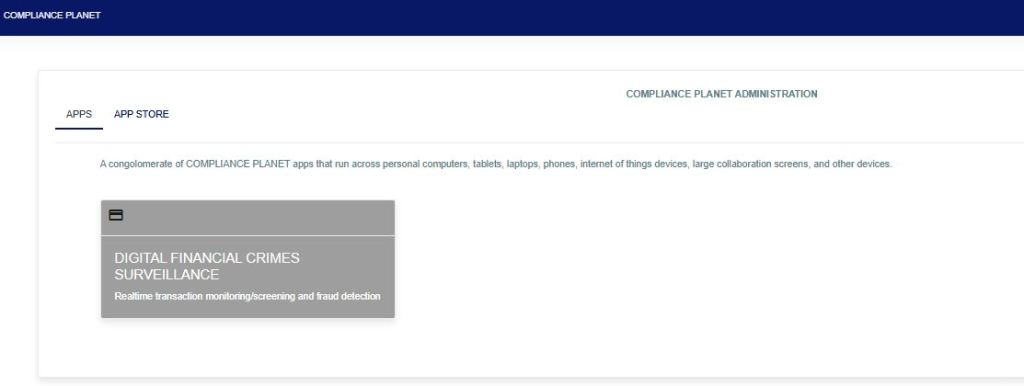
Fig a
STEP 2: From the left-hand side menu, click “TM Case Explorer” as in Fig. b below.

STEP 3: Input the case number to see the details of the account that has bridged the rule, as in Fig. C below. This can be exported to Excel for further review by clicking the “Export to Excel” button.
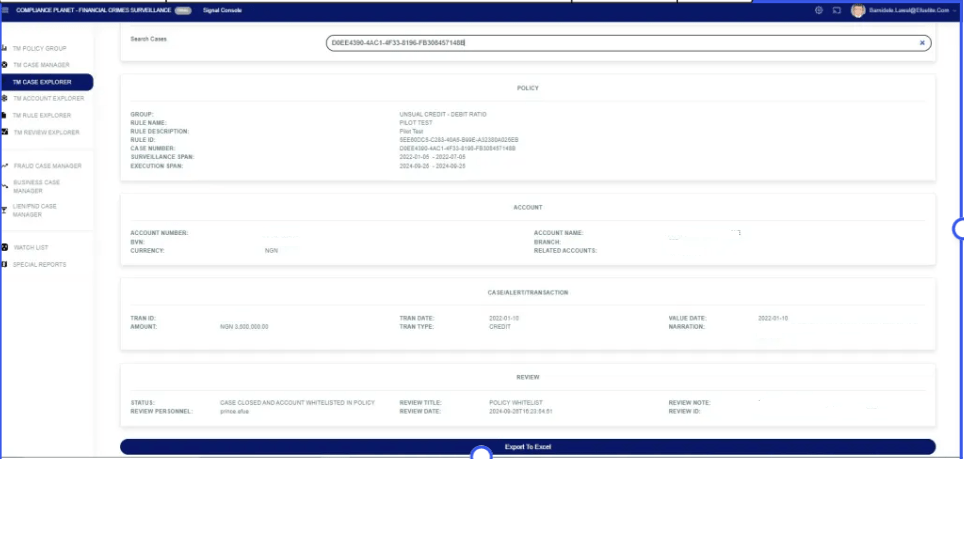
This image displays all the data for the case under review, including Policy Group, Rule Name, Rule Description, Rule ID, Case Number, Surveillance Span (the period of monitoring), and Execution Span (the last time monitoring was executed). Also, it displays the customer’s data and the review action.
For further enquiries:
Tel: +234(0) 816 555 9818
Email: solutions@efuelite.com
Web: http://solutions.efuelite.com
