
Note: This operation requires the Administrator or Auditor permission.
The BVN screening helps scan an institution for a match; it also indicates whether the search parameter (BVN) has already been profiled under the BVN Watchlist in the system, by displaying the account(s) the BVN is tied to.
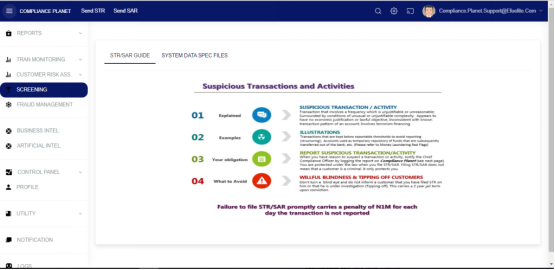
STEP 1: From the left-hand side menu, click “SCREENING” as seen below.
STEP 2: From the left-hand side menu, click “BVN Screening” as seen below.
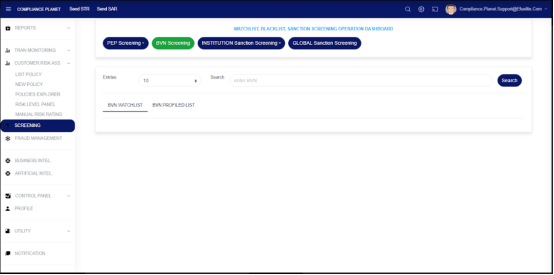
On the above page, enter a BVN in the Search field and click on the Search button to perform an instant search.
BVN WATCHLIST: This tab shows the account(s) tied to the searched BVN and profiled as watchlist at the institution.
BVN PROFILED LIST: This tab shows account(s) that the searched BVN is tied to, irrespective of whether the BVN is profiled under the watch list or not.
For further enquiries :
Tel +234(0) 816 555 9818
Email solutions@efuelite.com
Web https://solutions.efuelite.com
