How To Carry out Customer KYC Exception Report (NFIU CTR FTR) In Compliance Planet Anti Money Laundering/Core Banking Finance Software

This provides a downloaded report on customers with incomplete data (as defined by the NFIU) who have carried out reportable transactions.

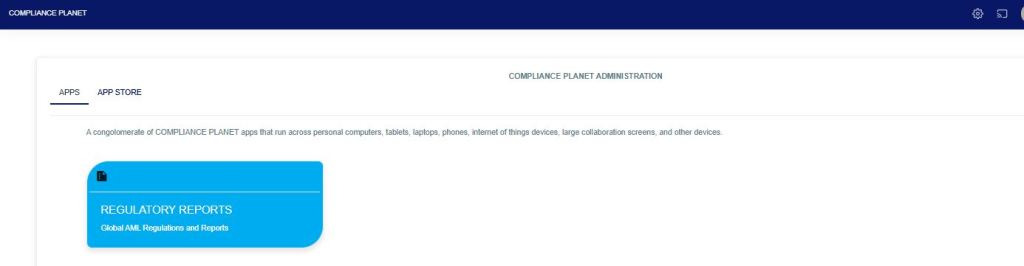
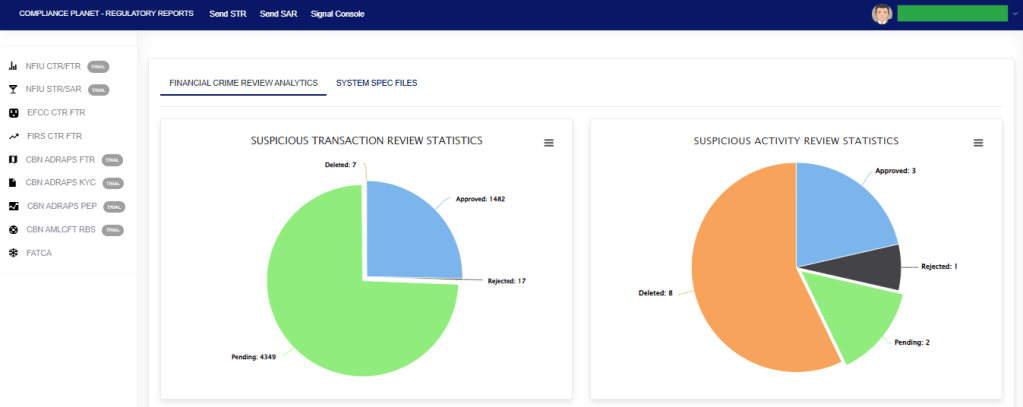
From the app dashboard, click on “REGULATORY REPORTS” as shown below

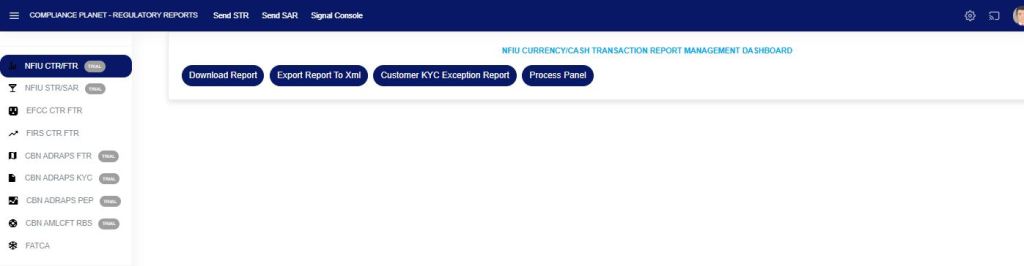
Click on ‘NFIU CTR/FTR’ on the drop-down list. See an example in Fig below. This will display the NFIU CTR/FTR page.

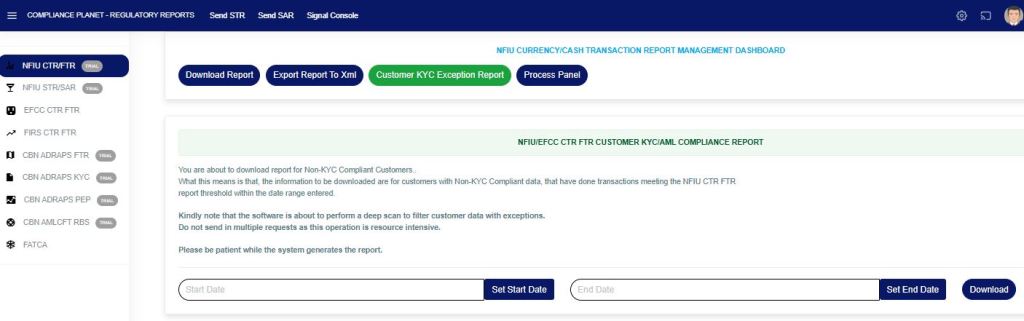
STEP 1: Click on “CUSTOMER KYC EXCEPTION REPORT,” which then displays a page as seen in Fig. 3a below.

Fig 3a

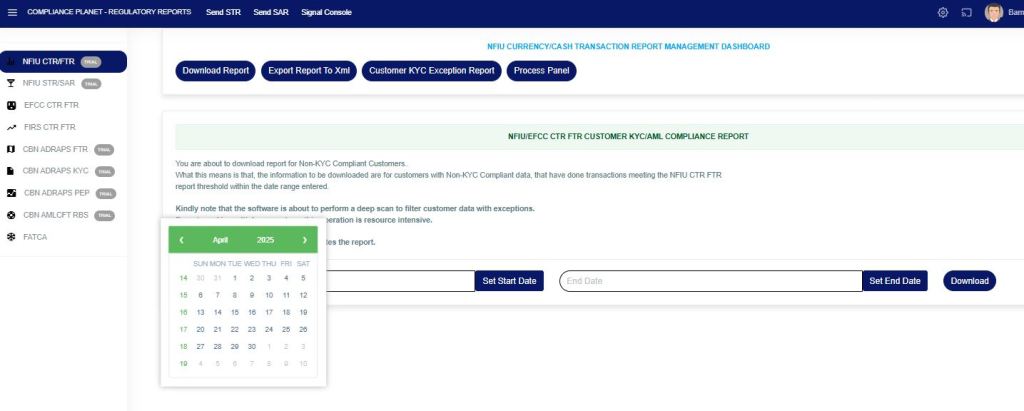
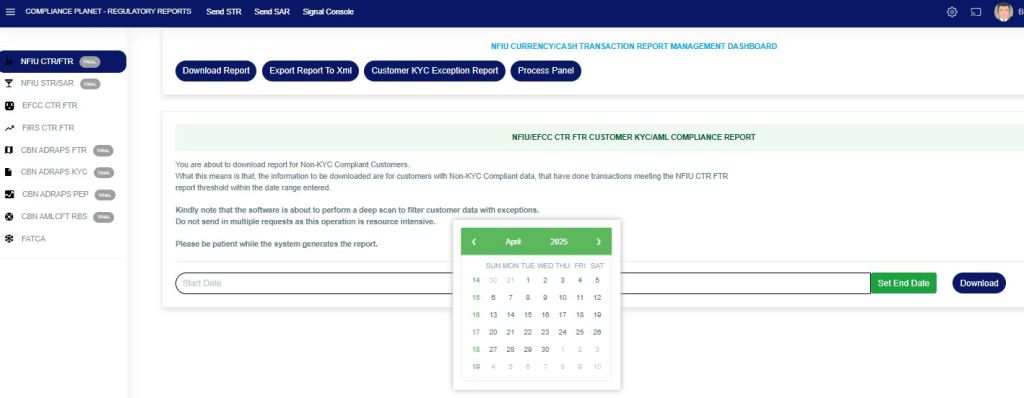
STEP 3: Enter the start and end date of the report you want to download as in Fig 3b and Fig 3c below.

Fig 3b

Fig 3c

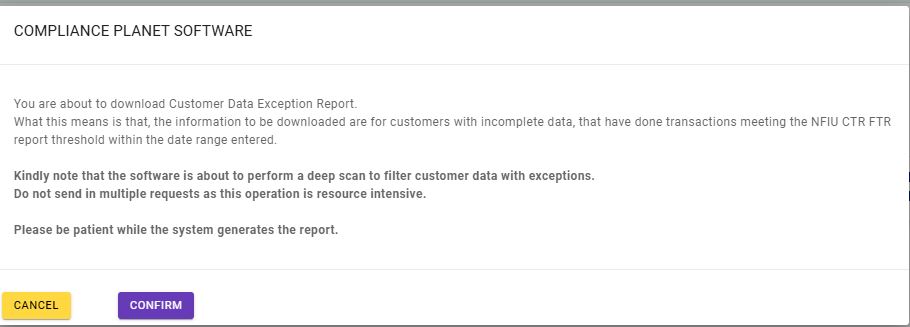
STEP 3: Click the “Download” button and click on “Confirm” to download the report as seen in Fig 3d below.

Fig 3d

This will be downloaded in an Excel file with the customers’ available data and the KYC exceptions.

For further enquiries: 
Tel: +234(0) 816 555 9818
Email: solutions@efuelite.com 
Web: http://solutions.efuelite.com
How To Activate Transaction/Fraud Monitoring Notification Per Alert In Compliance Planet Anti Money Laundering/Core Banking Finance Software

This section provides a guide on how to activate transaction/fraud monitoring notification per alert on the Compliance Planet AML Software, with step-by-step instructions and pictures.

NOTE: Only person(s) profiled as deputy supreme admin can carry out these operations 

To perform this operation;

STEP 1: From the left-hand side menu, Click ‘Control panel’ as in fig. 20a.

fig. 20a

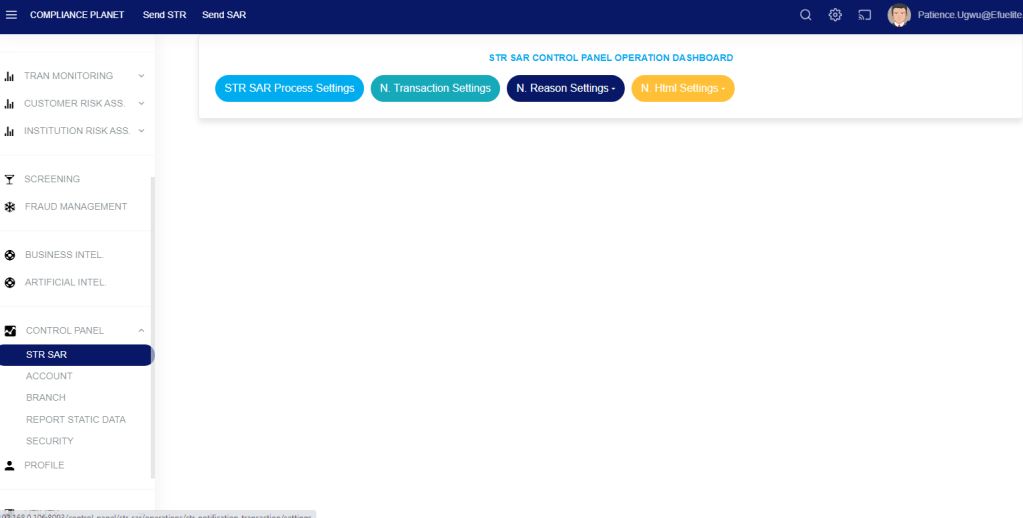
STEP 2: From the dropdown, Click ‘STR SAR’ as in fig. 20b

fig. 20b.

STEP 3: From the displayed page, click on ‘STR SAR Process Settings’ as in fig. 20c.

fig. 20c.

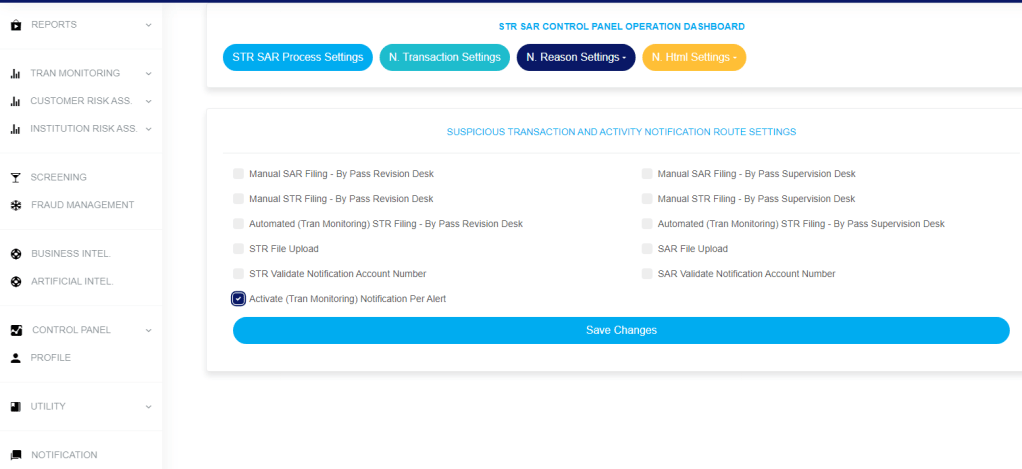
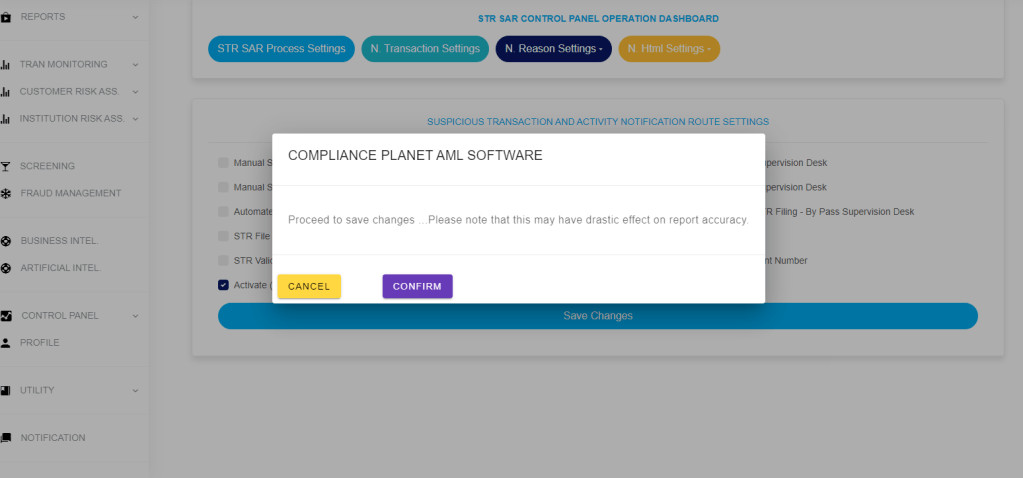
STEP 4: check the icon ‘Activate (Transaction/Fraud Monitoring) Notification Per Alert’ and click save changes as in fig. 20d.

fig. 20d.

STEP 5: Click on confirm to save changes as in fig. 20e.

fig. 20e.

PRINCE EFUE – PROFILE

He is an accomplished Software Engineer/Developer and Business Analyst with over 16 years of experience in the field of Software Engineering and Development.  My key areas of expertise include, but are not limited to the following;

  • Web, Mobile Software Development, and Engineering
  • Artificial Intelligence and Deep/Machine Learning
  • Natural Language Processing (NLP)
  • Recommendation Systems
  • Association Rules
  • Data Science, Business Analytics, and Modelling
  • Business Policy Automation
  • Fintech, Anti Money Laundering, and Financial Crime Automation (AML/CFT)

He is the MD/CEO of the Efuelite  Group of Companies with subsidiaries; to mention are Efuelite Solutions Ltd, Efuelite Code Hub Limited, Efuelite Rides Limited, Efuelite Meals Limited, Spiritual Sound Records Limited, etc. He is focused on developing innovative business solutions which perfectly fit into business models and processes, greatly enhancing employee productivity, improving product and service quality, and increasing process efficiency. My experience spans across Financial, E-Commerce, Medical, Military, and Education sectors; from technical and functional solution service integrations with firms such as Nigeria Inter-Bank Settlement System (NIBBS), Nigerian Electronic Fund Transfer (NEFT), Central Bank Of Nigeria (CBN), Fintechs and  

Commercial banks.

In 2011, he bagged a merit award from the National Youth Service Corps for developing solution(s) in northern Nigeria. Over the past few years, he has developed solutions that aided the Cashless Policy and Forex system from system rollout and technical support in challenging environments.

In 2017, he invented the Compliance Planet Anti Money Laundering (AML) Software an ISO 20700 certified product that enables financial institutions to discharge their data processing and reporting obligations under the Anti-Money Laundering and Combating Financing of Terrorism (AML/CFT) laws and regulations in Nigeria in the most efficient and effective manner.

This software handles the following amongst others: –

  1. Reports under the Money Laundering (Prohibition) Act 2011 (as amended)  
  2. Currency Transaction Report (CTR)  
  3. Foreign Currency Transactions Reports (FTR)  
  4. Suspicious Activity / Transactions Reporting (SAR/STR)
  • Reports under the CBN AML/CFT Data Rendition and Processing Systems (ADRAPS)
  • AML/CFT Risk-Based Supervision Reporting (RBS)  
  • Politically Exposed Persons Reporting (ADRAPS PEP)  
  • Three Tiered KYC reports  
  • Foreign Currency Transaction Report (ADRAPS FTR)
  • Report to the US Internal Revenue Service (IRS) under the Foreign Account Tax Compliance Act (FATCA)     
  • Workflow for electronic submission, review, and approval of Suspicious Transactions to the Compliance Department / Chief Compliance Officer.
  • Transaction Monitoring / Screening.
  • Report monitoring / Workflow / Analysis.
  • Data Governance, Data Mining, Machine Learning, and many more.
  • Task Manager
  • Validation of Foreign Nationals
  1. Sanction Monitoring/Screening.
  1. Enhanced Due Diligence
  1. Fraud Monitoring.
  1. Customer Risk Assessment and Monitoring.
  1.  Adverse Media Screening.

 This software has its Patent with the Federal Republic of Nigeria RP: NG/PT/2018/2767.

Over the past few years, he has developed solutions that aided the Cashless Policy and Forex system from system rollout and technical support in challenging environments.

 Prince has contributed vastly to the Microsoft open-source community of developers by building several NuGet programs widely used by programmers worldwide.

Some of his open-source projects and contributions are:

NuGet Gallery | Packages matching prince efue

NuGet Gallery | EfueliteSolutionsDateHelper 1.0.12

NuGet Gallery | EfueliteSolutionsRandomHelper.Core 1.0.0

NuGet Gallery | EfueliteSolutions.DbLogger 1.0.0

NuGet Gallery | EfueliteSolutionsMSSQLReaderHelper.Core 1.0.2

NuGet Gallery | EfueliteSolutions.APIConnect 1.1.4

NuGet Gallery | EfueliteSolutionsORACLEReaderHelper 1.0.0

He has a master’s degree in Business Management and Leadership from the London Graduate School; as well as a Doctorate degree awarded in Business Administration from the CommonWealth University London.

He has a postgraduate degree in Artificial Intelligence and Machine Learning (Business Applications) From the University of Texas at Austin.

He is a certified Google Data Analytics Professional.

He has a BSc in Biochemistry from Delta State University. A native of Delta State. He attended Code Academy College USA, a Fellow of the International Institution of Management Consultants, and a Certified Management Consultant.

How To download Non-KYC Compliance Report (NFIU STR/SAR) In Compliance Planet Anti Money Laundering/Core Banking Finance Software

This provides a downloaded report on customers with incomplete data (as defined by the NFIU) who have carried out reportable transactions.

From the app dashboard, click on “REGULATORY REPORTS” as shown below

This image has an empty alt attribute; its file name is reg-1.jpg

This will display a drop-down as in the image below. The dropdown lists the report types available on the Compliance Planet software.

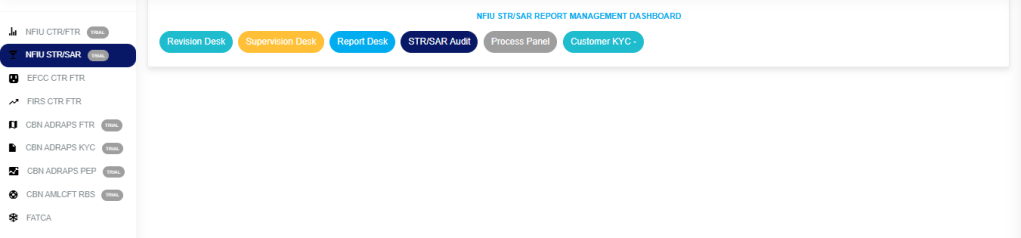
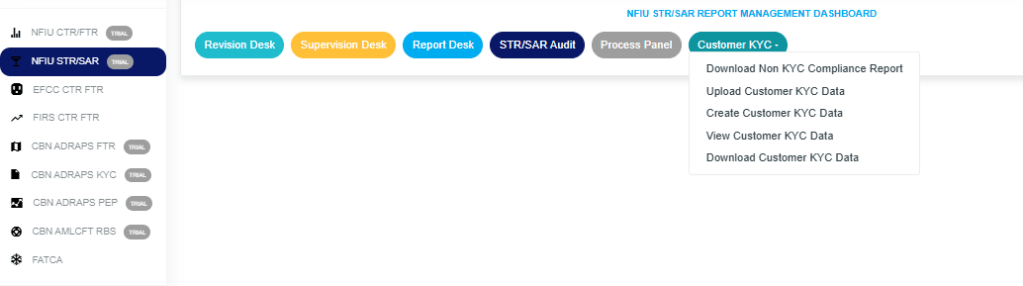
Click “NFIU STR/SAR” from the drop-down menu to open the NFIU STR/SAR page. See the image below.

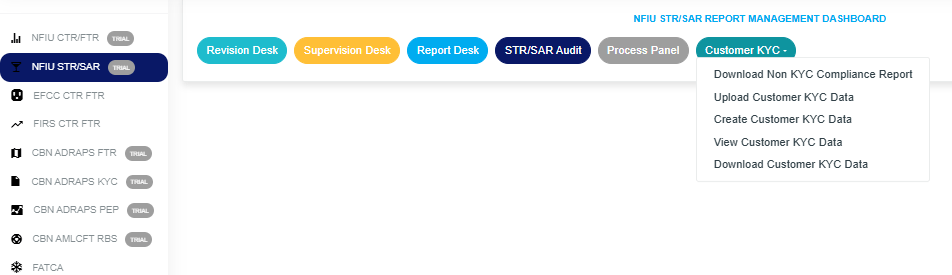
Click on “CUSTOMER KYC,” which then displays a page as seen in Fig. 3a below.

How to download the Non-KYC Compliance Report.


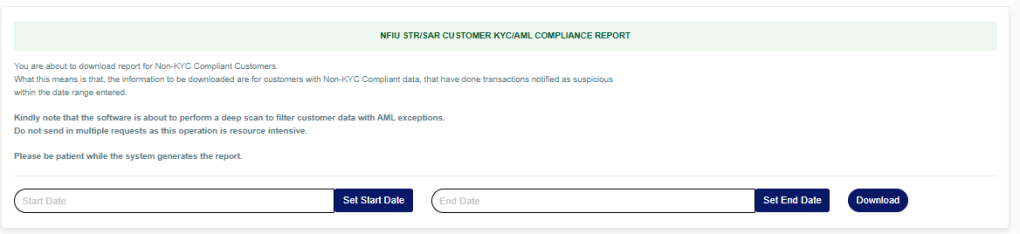
STEP 1: Click on “DOWNLOAD NON KYC COMPLIANCE PLANET” to display the NFIU STR/SAR CUSTOMER KYC/AML COMPLIANCE REPORT Page below.

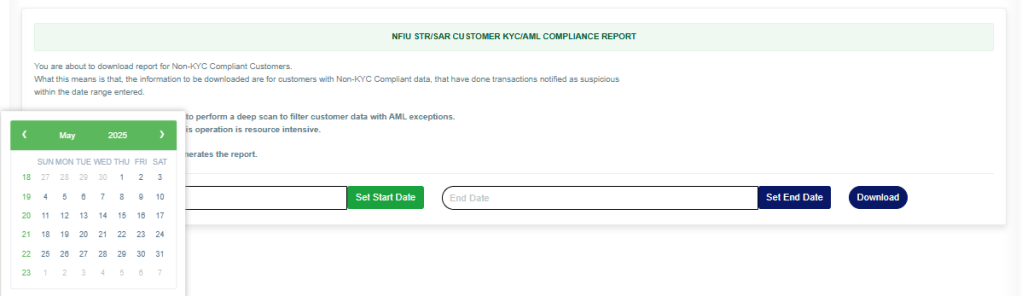
STEP 2: Enter the start and end date of the report you want to download, as shown in the images below.

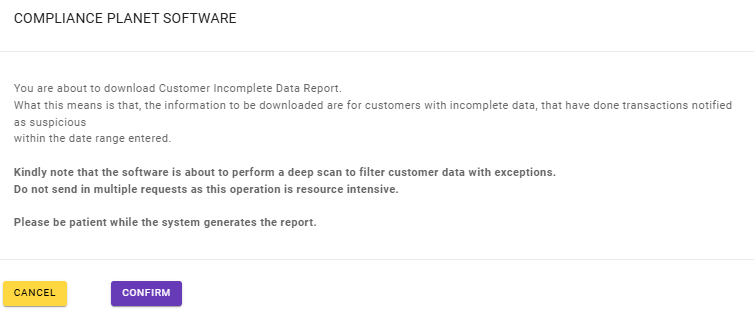
STEP 3: Click the “Download” button and then click “Confirm” to download the report, as shown below.

For further enquiries: 
Tel: +234(0) 816 555 9818
Email: solutions@efuelite.com 
Web: http://solutions.efuelite.com
How To Create Customer KYC Data (NFIU STR/SAR) In Compliance Planet Anti Money Laundering/Core Banking Finance Software

This create and adds a new individual customer data to the Compliance Planet Aml Software.

From the app dashboard, click on “REGULATORY REPORTS” as shown below.

This image has an empty alt attribute; its file name is reg-1.jpg

This will display a drop down as in image below. The dropdown lists the report types available on the compliance planet software.

Click “NFIU STR/SAR” from the drop-down menu to open the NFIU STR/SAR page. See the image below.

Click on “CUSTOMER KYC” which then displays a page as seen below.

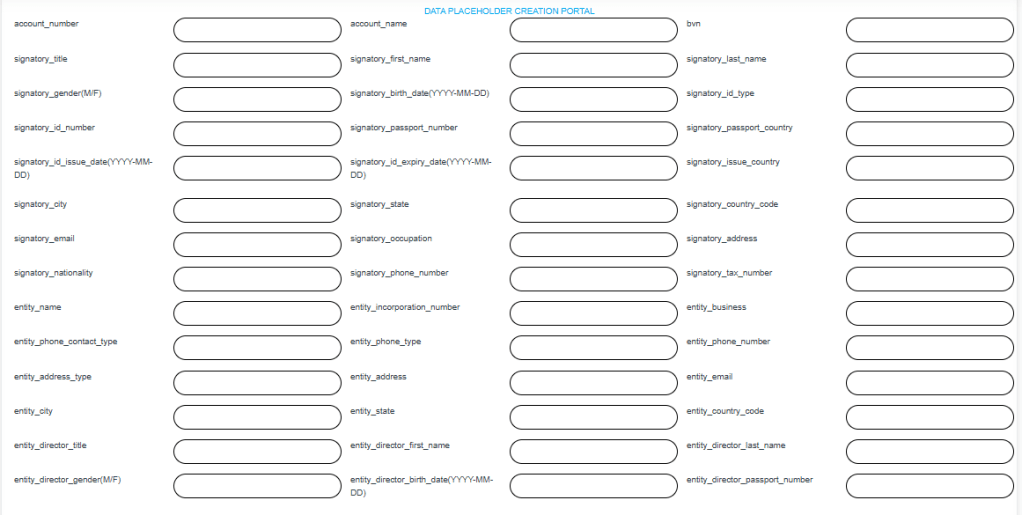
STEP 1: From the dropdown, click on “Create Customers KYC Data. This creates a new individual customer data. Click on “Submit Data Placeholder” to add the data as seen below.

For further enquiries: 
Tel: +234(0) 816 555 9818
Email: solutions@efuelite.com 
Web: http://solutions.efuelite.com
Customer KYC (STR/SAR) Categories Explanation in Compliance Planet Anti Money Laundering/Core Banking Finance Software

The Customer KYC Feature in Compliance Planet AML software helps users to fill in missing compulsory data into the software (STR/SAR) Module in order to be able to download a complete XML file.

  1. Download non-KYC compliance report: This downloads customer data that is incomplete. Account Number and BVN are compulsory fields.
  2. Upload Customers KYC Data: This uploads complete customer data that has been filled from 1. above.
  3. Create Customers KYC Data: This creates a new individual customer data.
  4. View Customers KYC Data: You can view data placeholder for a particular customer.
  5. Download Customers KYC Data: This downloads complete data placeholder that has been uploaded into the Compliance Planet Software.

For further enquiries: 
Tel: +234(0) 816 555 9818
Email: solutions@efuelite.com 
Web: http://solutions.efuelite.com

How to Upload Customer KYC Data (NFIU STR/SAR) In Compliance Planet Anti Money Laundering/Core Banking Finance Software

From the app dashboard, click on “REGULATORY REPORTS” as shown below.

This image has an empty alt attribute; its file name is reg-1.jpg

This will display a drop-down as in the image below. The dropdown lists the report types available on the Compliance Planet software.

Click “NFIU STR/SAR” from the drop-down menu to open the NFIU STR/SAR page. See the image below.

Click on “CUSTOMER KYC” which then displays a page as seen below.

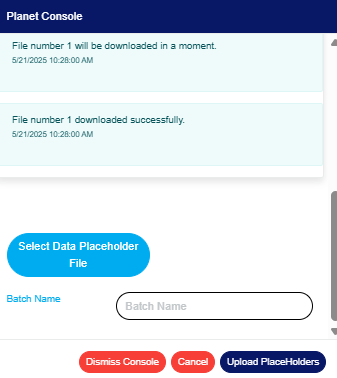
STEP 1: Click on “Upload Customer KYC Data” to display the Planet Console below.

Click on “Select Data Placeholder File” to upload the data file.
Fill in the name of your report in the “BATCH NAME” box.
Click on “Upload Placeholder” to confirm the process.
Click on “Dismiss Console” to close the console.
Click on “cancel “to cancel the process.

For further enquiries: 
Tel: +234(0) 816 555 9818
Email: solutions@efuelite.com 
Web: http://solutions.efuelite.com
How To Download Customer KYC Data (NFIU STR/SAR) In Compliance Planet Anti Money Laundering/Core Banking Finance Software

This downloads data placeholder for a customer from the Compliance Planet Software.

From the app dashboard, click on “REGULATORY REPORTS” as shown below.

This image has an empty alt attribute; its file name is reg-1.jpg

This will display a drop down as in image below. The dropdown lists the report types available on the compliance planet software.

Click “NFIU STR/SAR” from the drop-down menu to open the NFIU STR/SAR page. See the image below.

Click on “CUSTOMER KYC” which then displays a page as seen below.

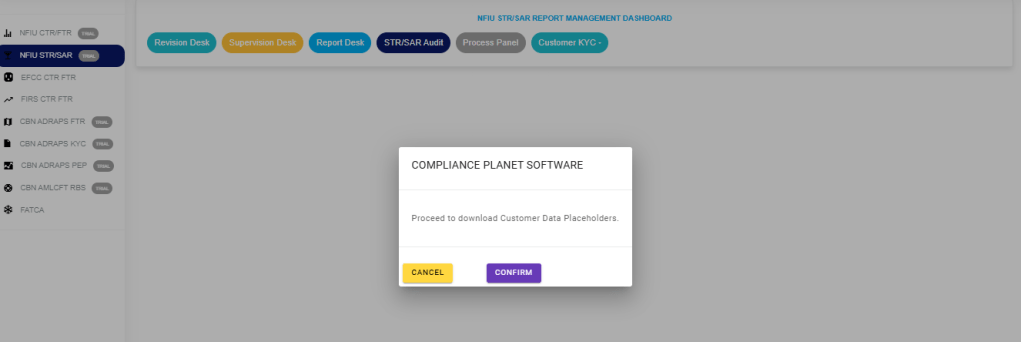
STEP 1: Click “DOWNLOAD CUSTOMER KYC DATA” in the dropdown options to display the confirmation console, then select “Confirm” to download as in the image below.

For further enquiries: 
Tel: +234(0) 816 555 9818
Email: solutions@efuelite.com 
Web: http://solutions.efuelite.com
How to Carry Out Log Operation On Customer Risk Assessment In Compliance Planet Anti Money Laundering/Core Banking Finance Software

The Log operation helps to view modified manually risk rated account in the Compliance planet.

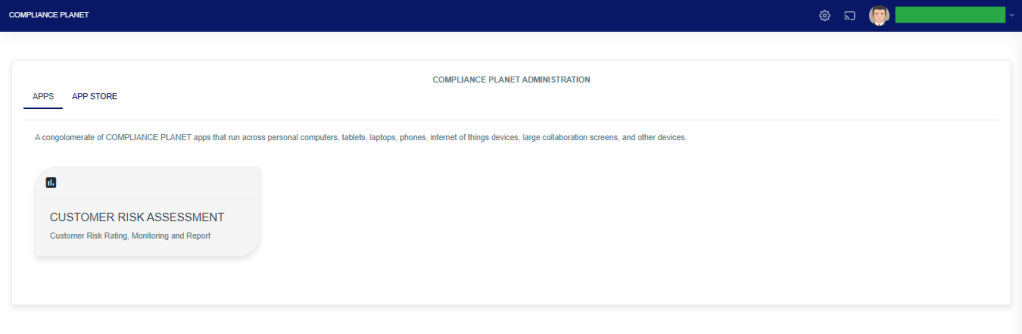
STEP 1: From the app dashboard, click on “CUSTOMER RISK ASSESSMENT” as displayed in the image below.

The above action will display a page as seen in the image below.

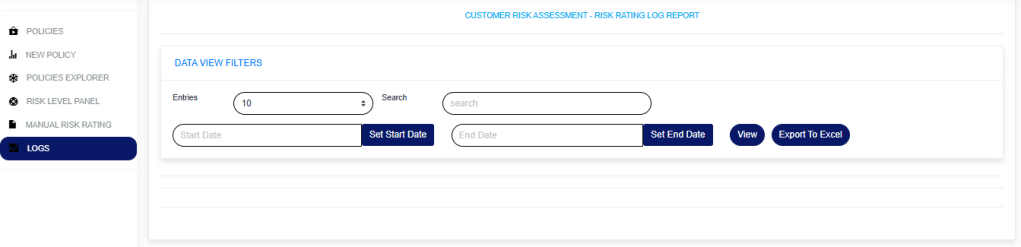
STEP 2: Click on “LOGS”, then select “DATA VIEW FILTERS”.

  1. Enter a “Start date” and “End date” to view the result.
  2. Click on the “View” button to see the logs.
  3. Entries: Select the number of records you want to see on the page.
  4. Search: This is to search for a modified account or who modified an account.
  5. To export the result to Excel, click on the “Export To Excel” button.

For further enquiries: 
Tel: +234(0) 816 555 9818
Email: solutions@efuelite.com 
Web: http://solutions.efuelite.com